Transcribe live streams as they happen
To transcribe a live stream, open it in Chrome with Video Transcriber and press Transcribe audio on the AI transcript tab. The text appears as the stream plays, with a time on every line, on Twitch, YouTube Live, Kick and other sites with an HTML5 player.
Add to Chrome — it’s free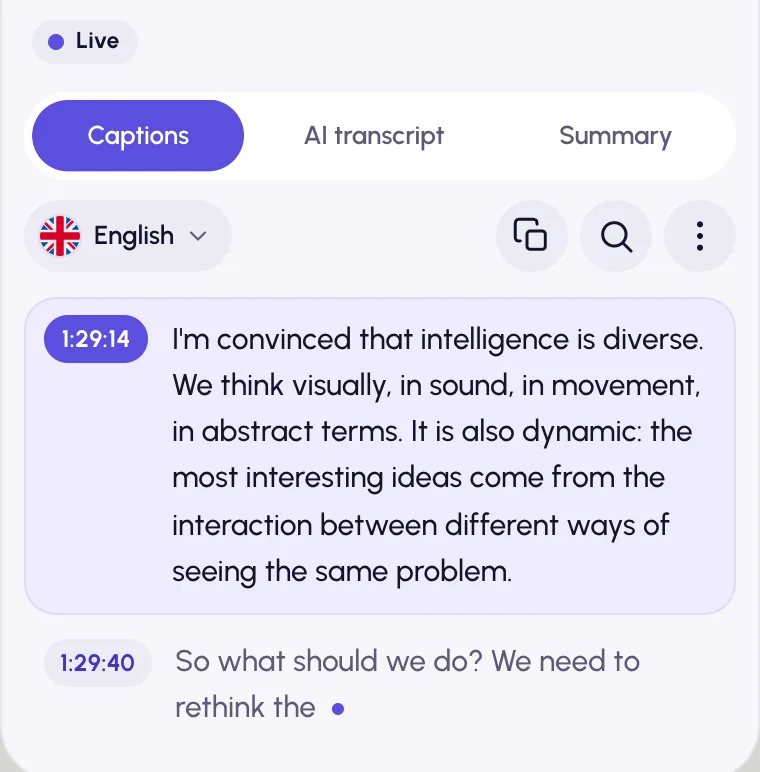
How to transcribe a live stream
Open the stream
On Twitch and YouTube the panel docks beside the player; on other sites it floats over the page.
Press Transcribe audio
On the AI transcript tab. Check the spoken language: on Twitch and Kick it is remembered for each channel.
Read, search, catch up
New lines appear as they are spoken. Search them, get a summary of the newest 30 minutes, or translate the stream.
Made for live
Real time
Chrome’s speech recognition writes the text as the stream plays, and our server adds punctuation. Text appears as soon as speech is heard.
A backup that steps in
If Chrome’s recognition can’t run or stops working, another engine takes over by itself, such as AI that transcribes the stream in short pieces about 30 seconds behind.
Stepped away?
Summarize what has been transcribed since you started, up to the newest 30 minutes, and click a time to rewatch it while the stream still lets you rewind.
Any language
Translate the stream’s text and show it as subtitles over the video, alone or together with the original.
At a glance
- Works on
- Twitch, YouTube Live, Kick and other HTML5 live players
- How
- Chrome speech recognition in real time; another engine, such as AI, when that can’t run
- Live summary
- Up to the newest 30 minutes
- Runs in
- Google Chrome on desktop: Windows, macOS, Linux, ChromeOS
- Price
- Free, no sign-up. AI within fair daily limits per account: 2 hours of AI transcription and 20 summaries or questions, plus limits on translation and filler-word removal
Live stream questions
Can I transcribe a Twitch or YouTube live stream?
Yes. Open the stream, open the panel and press Transcribe audio on the AI transcript tab. It works on Twitch, YouTube Live, Kick and other sites that play the stream in an HTML5 player.
Is there a delay?
In real time, text appears as soon as speech is heard, and punctuation is added a little later. When AI transcribes the stream instead, the text arrives about 30 seconds behind.
How accurate is live transcription?
Chrome’s speech recognition is good on clear speech but weaker on names, slang, game jargon and people talking over each other. Pick the right spoken language for the best result.
What does a live summary cover?
What Video Transcriber has transcribed since you started it, up to the newest 30 minutes. What was said before you started isn’t included.
What is sent, and where?
Unless Chrome has the language on your device, Chrome sends the stream’s audio to Google’s speech service. The recognized text goes through our server to Google Gemini for punctuation; when AI transcribes the stream, short compressed audio pieces go to Google Gemini and DeepInfra. Our server stores none of it (Privacy Policy).
More ways to use Video Transcriber
- YouTube transcriptsGet the transcript of any YouTube video next to the player, with or without captions.
- Video translationTranslate a video’s transcript and read both languages side by side or as subtitles.
- AI video summariesSummarize any video as a short gist, detailed notes or chapters, then ask it questions.
Your next video, as text.
Free, and installs in seconds.
- 1Open Video Transcriber in the Chrome Web Store
- 2Click Add to Chrome, then Add extension
- 3Pin it from the puzzle icon next to the address bar